Updated on September 17th, 2026
AD – PR Product | There has been a rise in idle games, along with games that sit at the bottom of your screen. For this post, I want to share cozy desktop idle games I recommend playing.
What are Idle Games?
Idle games are games you can play while doing other tasks, such as writing a blog post, editing a video, scrolling on social media, and watching YouTube. The games often sit at the bottom of your screen, or they can be moved to any area of your desktop. In this post, I will share 12 idle games I recommend.
12 Cozy Desktop Idle Games
Bongo Cat
The first idle game I recommend is Bongo Cat. Bongo Cat is a free-to-play game with a cat that tracks every click of your mouse and press of a key. As the counter increases, you can unlock new cats, hats, and emojis. You can move the cat anywhere on your desktop, and it is a cute, passive idle game.
Bongo Cat is free-to-play on Steam

Cozy Sanctuary
I received a copy of Cozy Sanctuary from Isolated Games. Cozy Sanctuary is a desktop game that sits at the bottom of your screen. In the game, you pet, feed, and clean animals and grow crops to feed them as well. As you play, you unlock new types of animals, and when they are happy, you can release them. You can have the game running while you work or relax and check on the animals every now and then to increase their happiness.
Cozy Sanctuary is $4.99 on Steam

Feather Land
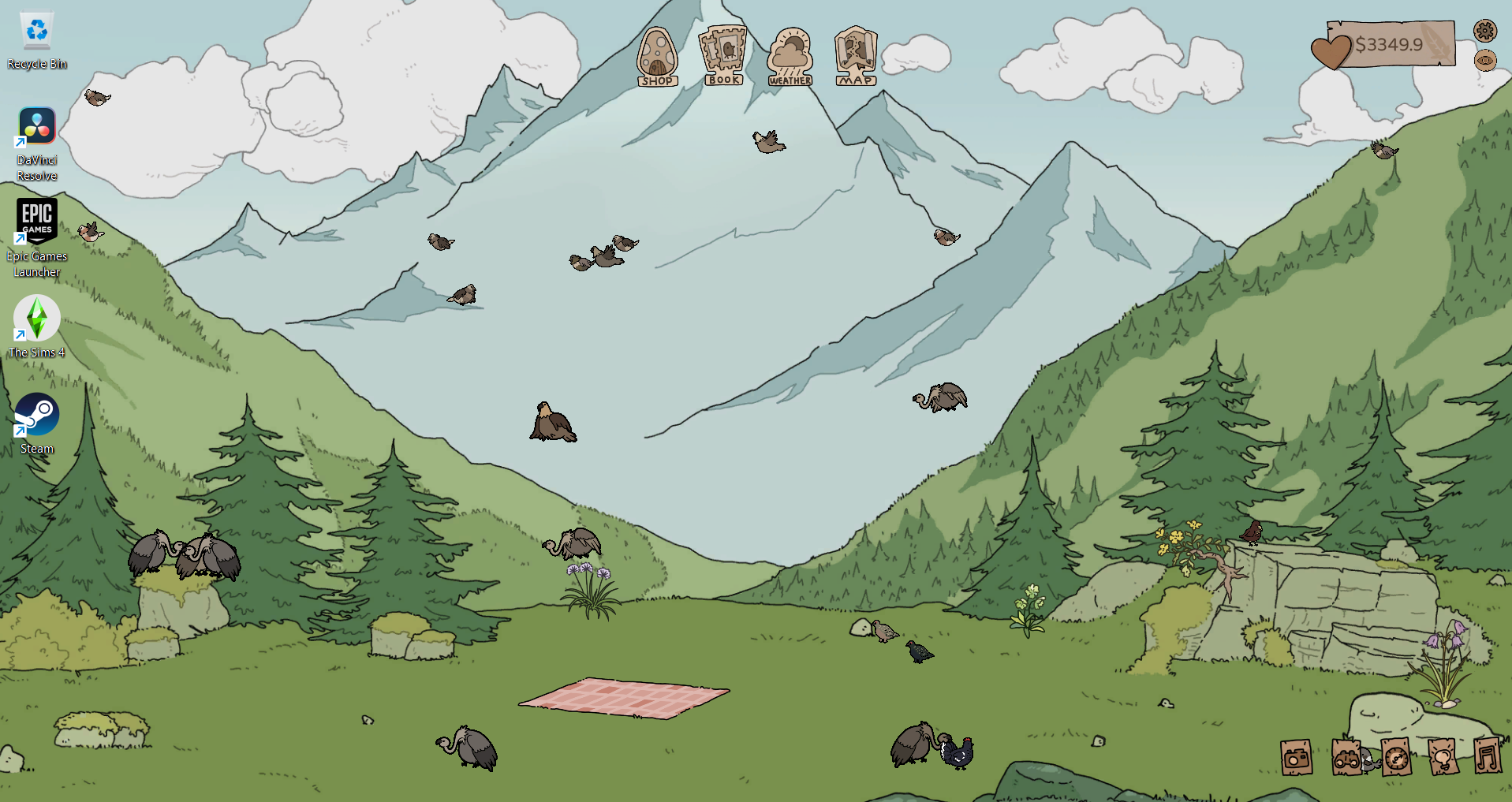
I was sent a copy of Feather Land from Pretty Soon. In Feather Land, you hatch bird eggs, feed them, and earn coins to unlock upgrades and new biomes with even more birds. There is the option to play in fullscreen, windowed, and wallpaper mode, and I prefer wallpaper, as you can watch the birds in the background. Along with watching and feeding the birds, there are productivity tools including a Pomodoro timer, to-do list, and a notebook. You can also use the in-game radio to play calming music.
Feather Land is $6.99 on Steam
Gourdlets
Gourdlets is a sandbox building game where you create a town for adorable gourdlets. The game can be played in full-screen or half-screen mode, and in half-screen mode, you can choose the percentage of the screen you want the game to cover. You can also pin the half-screen to the top, bottom, left, or right of your screen. While in half-screen mode, you can play the game as normal or just watch your gourdlets wander around your town.
Gourdlets is $4.99 on Steam

Idle Bookstore
I was given a copy of Idle Bookstore from Purpledoor Studios. In the game, you run a bookstore that you can move around your screen or hide completely. As you sell books, you earn money to buy more shelves and decorations. You also write your own books, and every keystroke and mouse click is counted towards the writing. Once you reach the set word count, you can publish the book and sell it in your store. You can also receive an offer to sell your book for a one-time price.
As you play, you can unlock more upgrades, such as new decorations, a music player, and the ability to hire employees. Idle Bookstore is a mostly passive game, but you will have to actively stock bookshelves until you can hire employees. You will also have to create new books to write once you have published the previous ones. Overall, Idle Bookstore is a cute book-themed idle game.
Idle Bookstore is $5.99 on Steam

Missy’s Bugtastic Little Planet
I received a copy of the game from Mullwave Games. Missy’s Bugtastic Little Planet is an idle game where a cat named Missy catches bugs. You earn money from the bugs Missy catches, which you can use to buy new grass, flowers, decorations, hats, outfits, and upgrades. You can also adjust the size of the planet and move it to any location on your desktop, and it is a great, passive idle game.
Missy’s Bugtastic Little Planet is $2.99 on Steam

My Little Life
I received a copy of My Little Life from Keymailer. My Little Life is a life simulation game that sits at the bottom of your screen. In the game, you build and decorate your little person’s home, find them a career, work towards their promotion, and recruit more little people. You can watch the first 30 minutes of gameplay on my YouTube channel. My Little Life is more hands-on than other desktop games on this list, but it is a fun take on a life simulation.
My Little Life is $5.99 on Steam

Rusty’s Retirement
Rusty’s Retirement is an idle farming simulation game that sits at the bottom of your screen. You can choose the vertical mode as well to have a vertical farm. In the game, Rusty plants and grows crops, and you slowly unlock new crops and expand your farm. You can also have robot assistants help Rusty. Rusty’s Retirement is less hands-on than My Little Life, and it is a good little farming simulation game.
Rusty’s Retirement is $6.99 on Steam

Spirit City: Lofi Sessions
Spirit City: Lofi Sessions is a focus tool with lo-fi music that you can have in the background while you work or relax. The game has a to-do list, timer, habit tracker, and journal you can use. You can also customize your character and the room, change the activity your character does, and the lighting and sounds of the room. You earn spirit credits by completing the daily tasks and having the game running. Then, you use the spirit credits to unlock new clothing, accessories, furniture, and decor. As you level up, you can find a new spirit to be your companion.
Spirit City: Lofi Sessions is $11.99 on Steam

Tame-a-goat-chi
I received a copy of the game from Sparks Forge. Tame-a-goat-chi sits at the bottom of your screen, and in the game, you feed, water, pet, and wash goats. You can also play mini games with the goats, from tic tac toe to goat ball. As you earn coins, you can unlock new goats, crops to feed to the goats, toys, and other objects. Also, you can hire workers and assign them tasks to make the game more passive as you progress.
Tame-a-goat-chi is $4.99 on Steam

Weyrdlets 2.0
Weydlets is an idle virtual pet game where you care for a pet, decorate their home, and play mini games. With Weyrdlets, there is a desktop mode where your pet will wander around your screen, dig for treasure, and grow an orchard. If your pet becomes too distracting, you can turn off free room and the visibility of the pet. Desktop mode also has productivity tools, including a to-do list, Pomodoro timer, and wellness tracker.
Weyrdlets 2.0 is $6.99 on Steam

Whimside
I received a copy of Whimside from Future Friends Games. Whimside is a creature collection game that sits at the bottom of your screen. As you play, you collect whimlings, breed them to create new ones, unlock new biomes to explore and whimlings to catch, and decorate a garden space. Whimside is a fun game that you can actively or passively play.
Whimside is $5.85 on Steam

Had never heard of any of these. Thanks for sharing.
You’re welcome! I think idle games are great because you can have them running in the background while you’re on the computer. Also, some of them do have productivity tools like to-do lists and timers.
That’s quite an interesting concept, while I do love multitasking, I do prefer have it “fullscreen” ahah. I usually opt for watching/listening to something while being on my steamdeck, for exemple.
I should try one of these, however!
I do think it is interesting that there has been this rise in idle games recently.
I often have Spirit City playing music in the background while I work. I also recently played Feather Land and I like the wallpaper mode as it just becomes your computer’s wallpaper.
These sound so fun! xx
Danielle’s Beauty Blog
They are great games!
This was a really fun and interesting list of cozy desktop idle games to try. I liked how the article highlighted relaxing and low-stress games that are perfect for unwinding while still staying productive. Cozy gaming has become so popular lately, and these recommendations seem perfect for casual players. Great picks and enjoyable read!
Thank you! It is nice having games you can play while still being productive. I especially like Spirit City for the lo-fi music and to-do list!
Wow!!! This is the first time I heard of idle games. They sound cool. Maybe I should try playing one while taking a short break from my creative work. Thank you for sharing something new with me.
I definitely recommend checking one out! It is nice because you can have the game running in the background while you are working.
I enjoy Spirit City for the lo-fi music and productivity tools. I also recently played Feather Land, and I like having the game in wallpaper mode.