Updated on January 16th, 2023
The first time I was asked by a brand to see my media kit, I had never made one before. I quickly did some research and scrambled one together and sent it to the brand. In this post, I want to share with you what to include in your media kit if you are wanting to work with brands.
*This post contains affiliate links, which means I may earn a commission if you make a purchase through my links, but there is no extra cost to you.
To begin with, a media kit is a document about your blog including your blog’s statistics that you share with potential brands you want to collaborate with.
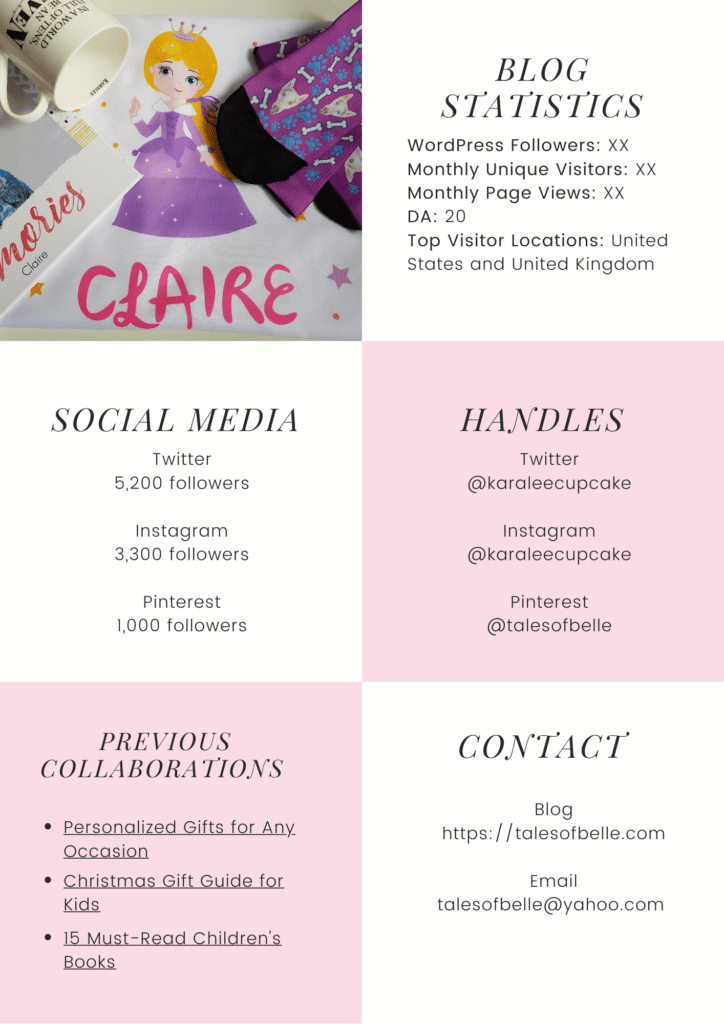
I made my media kit using Canva. Canva offers free templates for media kits, which is convenient, and you can choose a design that fits your blog and then customize the colors, pictures, and text. If you are more adventurous and creative, you can always start from scratch. I would still recommend using Canva since you can easily add different elements. You can also look on Gillian Sarah for budget-friendly and professional website templates and media kit templates as well as on Etsy. I also included my media kit that I made on Canva at the end of this post.
Now that you have chosen a template or started from scratch, what should you add?
Your Blog’s Name
First, you should include the name of your blog and the URL. You can also include the tagline for your blog along with your blog’s logo if you have one.
About You + Your Picture
Along with your blog’s name and URL, you should include a short bio about yourself. In my about me, I included my name, age, background, and where I live since your location can be an important factor for brands. Next to my about me, I included my picture since it is nice to be able to put a face to the name, but it is not necessary to include your picture.
About Your Blog
Next, I added a background about my blog. I included the year I started my blog and what topics I blog about and examples of those topics such as I write reviews of cosmetics, skincare, and books.
Services Offered
Another section you should add is what you are willing to do for the brand such as write product reviews and sponsored posts, host giveaways, promote them on social media, place ads on your blog, conduct photoshoots, create vlogs, be a brand ambassador or affiliate, host an event, etc.
Blog Statistics
This is probably the most important section of the media kit, and when the brand approached me they specifically asked to see my blog’s stats. The things to include in your blog statistics section are:
- Followers – total number of followers on your blog
- Monthly unique visitors – I took an average of my monthly visitors for the past year
- Monthly page views – again I took the average of my monthly page views for the past year
- DA – your domain authority is a number 1-100 and the higher your DA, the higher your blog will rank in search engines like Google. You can check your DA on Moz
- Email subscribers (optional) – you can include how many email subscribers you have if you have a good amount
- Engagement (optional) – you can also include how much engagement you receive on your blog such as the average number of comments or likes on your posts
Social Media
Along with your blog’s statistics, you should include the number of followers on your social media accounts such as Twitter, Instagram, Pinterest, Facebook, TikTok, and LinkedIn. You do not have to include every social media account especially if you have relatively few followers on one account. If you do have a low follower count, you can include weekly impressions on Instagram or monthly viewers on Pinterest instead. If you have a YouTube channel or a Tumblr you can include those as well. Some bloggers also like to include a combined reach that includes the total number of social media followers on all their accounts.
Contact
This section is especially useful when you are the one approaching brands. The contact details you should include are:
- Blog URL
- Email address
- Social media handles
You can also include your phone number, but I left it out since I get so many spam calls as it is. Some bloggers also include their mailing addresses, but I would not share my address unless I know for sure I am going to work with a brand and they are going to send me a product to review.
Blog Pictures
Along with all the text sections, you should include a couple of photos from your blog because it helps break up all the text and it also lets brands know what pictures they can expect from you. You can also change the photos to cater to the brand you are wanting to collaborate with such as including photos you have taken of jewelry if you are wanting to work with a jewelry company.
Optional Add-Ons
Previous Collaborations
If you have not collaborated with any brands yet, you do not have to include this section, but if you have previously worked with some brands, you can link to your blog posts for those collaborations. You can also add links to previous collaborations that are relevant to the brand such as previous gift guides you have written when you are wanting to work with a brand for a new gift guide. In this section, you can also simply list the brands you have worked with and include their logos or you can include testimonials from brands to show that you are reliable to work with.
Demographics
If you have Google Analytics, you include demographics for your blog. The demographics you can include about your readers are:
- Age range
- Gender
- Location (top 3 countries)
If you have a plan on WordPress including the free plan, you can see the breakdown of your blog’s views by country in your stats section. I would recommend including the location of your readers if most of your readers are based in a country besides yours. I live in Denmark, but since I am American and blog in English, most of my readers are located in the US, UK, and Canada.
Best Posts
I have seen some media kits where bloggers provided examples of their best posts or popular posts. This section would be good to show brands what they can expect from you and it is also a good way to incorporate images from your blog as well.
Fees
I did not include fees in my media kit, but some bloggers may choose to include them to let the brands know that they charge for their services and if the brand has a budget. If you do not include fees, it leaves the discussion open with the brand.
After you include the different sections of your media kit, you should proofread and edit it. You should make sure to spellcheck your text, correct any grammar mistakes, and maybe have someone else read through it. You should also personalize your media kit by changing the fonts and colors to suit you and your blog. When you have completed your media kit, you can download it as a PDF (for this post I downloaded my media kit as a PNG so I could upload the images here). Also, be sure to update your media kit to change any statistics such as new follower counts, or add any new sections such as if you collaborated with a brand.
Now you are ready to start working with brands!

Thank you for sharing, I have been looking into writing a Media Kit, and was thinking of downloading a etsy template, but I might make one myself, bookmarking this for future 🙂
No problem! You can definitely buy a template on Etsy, but Canva does have free templates that you can use as an alternative!
This is really great information. This is very useful for us newbies!
From that last picture, I can see you’ve got a mighty fine media kit. Lovely! And how brave of you to make one. Bravo! I really think you’re brave, because in all my years of blogging (which is intermittent), I can’t imagine how I could capitalise on my content. Although, I know another Indonesian blogger who does.
Anyhow, more power to you!
Thank you so much!
This is a great guide, thanks for publishing!
Thank you!
Excellent post, I need to create one as well. I pinned this post for later, thanks!
Thank you!
Thanks so much for this I haven’t made a Media kit yet I have no idea how to start.
You’re welcome! I hope this post will help you!
Thanks for sharing
You’re welcome!
Need to start updating my Media Kit and will use your blog post as a guideline of what to include and not to include. Thank you so much for the helpful tips.
Kaye
You’re welcome! It’s good to keep update your media kit every now and then!
Oh my gooodness I have been researching how to make a kit and haven’t found anything directly helpful as this!! Thank you SO much !! Going to bookmark this to get started 🙂
You’re welcome! When I had to make my media kit I looked on a ton of different websites & even in 2 blogging ebooks, but the information was all over the place & not that descriptive, so I made my own guide haha
YES! I found the same thing. thank you again for sharing!
Thanks for this, really useful, I didn’t know how to do one.
Thank you! I’m glad you find it useful!
I’ve been looking for something explaining a media kit! Thank you for sharing!!
You’re welcome!!!
Thank you for this! I was at a total loss as to how to do a media kit.
You’re welcome!